RECRecord once. Reclaim your time.

A simpler way to automate. Macro Recorder for Windows & Mac

Turn everyday clicks and keystrokes into reusable workflows. Macro Recorder is a keyboard and mouse recorder that helps you automate repetitive tasks, from simple mouse actions to multi-step desktop routines.
FreeWindows 10 / 11macOS 14+
Mouse recorder
Keyboard recorder
one-time · lifetime license
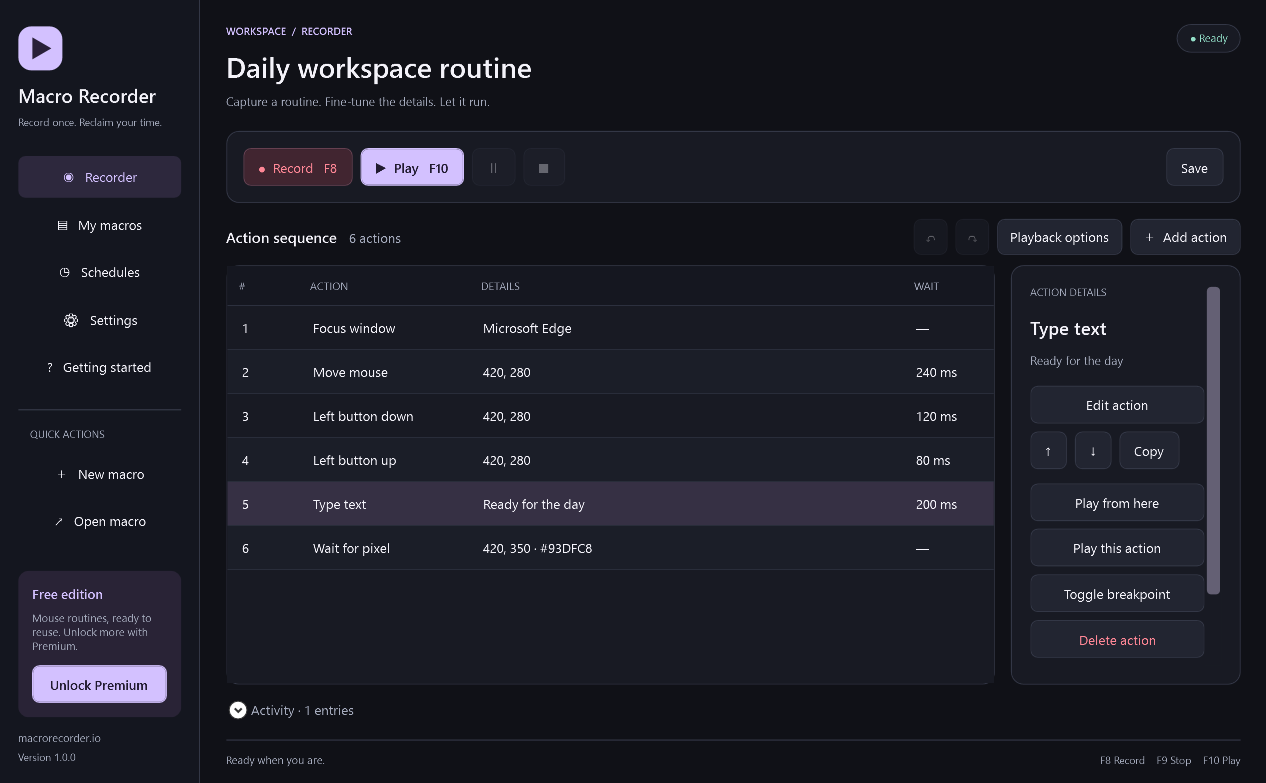
Macro Recorder keyboard and mouse recorder for Windows, with a recorded action sequence and step editor
Record once. Reclaim your time.
Windows & macOS
Features

Your keyboard and mouse, on repeat

Start with a free mouse recorder. Add keyboard recording and a flexible macro editor when your workflow needs more.

Mouse recorder

Capture mouse movements, clicks, dragging and scrolling. Save and replay your mouse macros with the Free edition.

Free · no trial timer

Keyboard recorder

Record keystrokes and shortcuts, insert Unicode text and combine keyboard and mouse actions in one Premium routine.

Premium · keyboard automation

Visual macro editor

Reorder steps, adjust delays, duplicate actions and undo changes. Set playback speed, repetitions and a countdown.

Premium · precise playback control

Window, pixel & image waits

Focus the right window and wait for a window, pixel or captured image before continuing the next action.

Premium · desktop automation

CSV, variables & loops

Repeat form filling and data entry with CSV rows, clipboard actions, variables and conditional steps.

Premium · reusable workflows

Schedules & debugging

Schedule routines, add breakpoints and play individual steps. Mac schedules run while the app is open.

Premium · test before running

Macro Recorder for Windows

A native desktop automation tool for Windows 11 and 64-bit Windows 10, version 1809 or later. The installer includes the runtime; no coding required.

  • F8 Record · F9 Stop · F10 Play
  • Esc Stop
Download · Windows

Macro Recorder for Mac

A native SwiftUI app for macOS 14 or later, on Apple Silicon and Intel. Allow Input Monitoring to record and Accessibility to replay. Screen actions also need Screen Recording permission.

  • ⌃⌥R Record · ⌃⌥S Stop
  • ⌃⌥P Play · ⌃⌥⌘. Emergency stop
Download · macOS
How it works

Record. Refine. Replay.

Perform the task once, save a macro and run it again when you need it. You stay in control of every action.

1

Record your routine

Open your target app, start recording and perform your clicks. Premium also captures keyboard inputs.

2

Save and fine-tune

Stop and save a .mrec file. With Premium, edit steps, add delays, set loops or use CSV data.

3

Replay when ready

Test the routine on a small task, then replay it. Keep the desktop unlocked and the stop shortcut within reach.

Less repetition, more focus

Desktop automation for everyday work

Use a macro recorder to repeat the parts of your work that follow the same steps. Start small, review your recorded actions and keep control of the result.

Forms & data entry

Combine a keyboard recorder with mouse clicks to fill recurring forms. Premium CSV data loops and variables help you work through rows of information.

Repeated desktop routines

Replay a familiar sequence across desktop apps. Add window focus, clipboard actions and timed delays instead of repeating each click yourself.

Repeatable app checks

Reproduce a sequence of interface actions, pause at breakpoints and test individual steps. Pixel and image waits help a routine wait for the right screen.

Pricing

Simple, one-time pricing

Use the mouse recorder free. Purchase Premium once to unlock the complete keyboard and mouse recorder for Windows and Mac. No subscriptions or renewals.

Free

Mouse recording and playback, ready to use.

$0
  • ✓Mouse movements, clicks, drag and scrolling
  • ✓Save and reopen local mouse macros
  • ✓Local library, recovery and stop controls
  • ✓No trial timer
Full feature set

Premium

The complete desktop automation toolkit.

$29.99one-time · lifetime license
  • ✓Everything in Free, plus keyboard recording
  • ✓Unicode text, full step editor and undo/redo
  • ✓Playback speed, repetitions and custom countdown
  • ✓Window focus, relative coordinates and screen waits
  • ✓CSV data loops, variables, clipboard and conditions
  • ✓Breakpoints, partial playback and schedules
  • ✓Lifetime updates · no recurring fees
  • ✓5 device activations per license
FAQ

Answers before you automate

Learn how the mouse recorder, keyboard recorder and Premium automation features fit your setup.

A macro recorder captures a sequence of mouse movements, clicks and keyboard inputs so you can replay a desktop task. Macro Recorder combines a mouse recorder and a Premium keyboard recorder in one app for Windows and Mac.

Yes. The Free edition records and replays mouse movements, clicks, dragging and scrolling. You can save and reopen local mouse macros without a trial timer. Keyboard recording and advanced automation require Premium.

Premium captures physical keyboard input and supports Unicode text actions. Combine keystrokes, keyboard shortcuts and mouse clicks in one routine. Avoid recording passwords or other sensitive information.

Yes. The native Mac app requires macOS 14 or later and supports Apple Silicon and Intel. Enable Input Monitoring for recording and Accessibility for playback. Screen Recording permission is needed for screen-based actions.

The Windows app supports 64-bit Windows 10 version 1809 or later and Windows 11. The installer includes the .NET runtime. Playback requires an unlocked interactive desktop and suitable permissions for the target app.

Premium includes a step editor with reordering, duplication, deletion, comments and undo/redo. Adjust delays and coordinates, insert text actions, add loops and variables, or test a single action with breakpoints.

Yes. Premium supports CSV data loops, variables, clipboard actions and text input. You can build repeatable routines for forms and spreadsheet workflows. Test a small sample before running a batch.

Premium can focus windows and wait for windows, pixels or images before continuing. Image matching uses the captured template's scale; OCR and scale-independent recognition are not included.

Premium includes scheduling. Windows supports Windows schedules and command-line schedules. Mac schedules run while Macro Recorder is open. Playback still requires an unlocked desktop and any necessary permissions.

Both apps save readable .mrec files, but keyboard codes, target apps and display coordinates differ. The Mac app can open Windows version 1 files for review and explicit conversion. The current Windows app does not play Mac version 2 files. Test each workflow on its target system.

On Windows press Esc; F9 stops recording and F10 plays, pauses or resumes. On Mac use Control–Option–Command–Period for the emergency stop. Control–Option–S stops recording and Control–Option–P controls playback.

Macro files are stored locally as readable JSON. The recording itself is not uploaded to this website. Activation sends a device fingerprint and app/device metadata to the licensing server. Keep saved macros private if they contain personal information.

Premium is a one-time lifetime purchase with updates and up to the number of devices shown at checkout. An internet connection is required for initial activation. Successfully activated apps cache the license locally for offline use. Contact support to release a device slot.

Eligible Premium purchases have a 3-day refund window. Read the Refund Policy for its conditions and contact support with your order details to request a refund.

A little less repetition. A little more time.

Create your first mouse macro, then build a workflow that works for you.

Download